Database Basics: Tables, Records, and Fields
Every school office, library, and shop keeps lists: pupils and their classes, books and their borrowers, items and their prices. A database is an organised way of keeping such lists on a computer so that information can be stored once, found quickly, and kept accurate. This guide teaches database basics tables records fields using something you already know: the school library register. By the end, you will be able to explain what a table, a record, and a field are, and why databases beat paper lists for big jobs.
What Is a Database?
A database is a collection of related information stored on a computer in an organised way. A database program, called a database management system, helps you add, change, find, and sort that information. The library register is a database. So is the school admission record, the attendance list, and the catalogue of a bookshop. What makes them databases is not the computer: it is the organisation. A drawer full of random papers is not a database, but the same papers sorted and labelled are the start of one.
Databases matter because paper lists break down when they grow. Finding one pupil among fifty is easy on paper; finding one book among five thousand is slow and tiring. A database finds any item in seconds, sorts lists any way you ask, and lets many people use the same information without copying it. That is why almost every organisation keeps its important lists in a database.
Tables, Fields, and Records
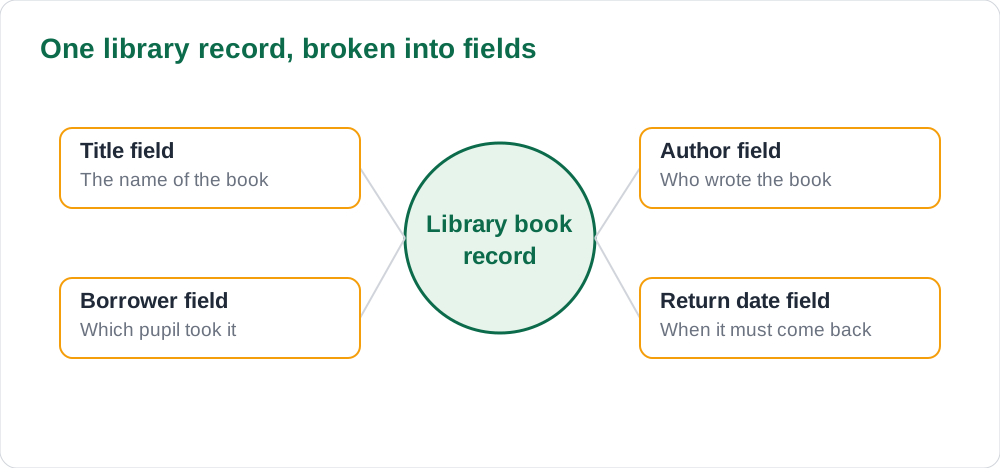
A database organises information into tables, and a table is like one register page with rows and columns. Each column is a field: one kind of information, such as Book Title, Author, or Return Date. Each row is a record: all the information about one single thing, such as one book or one pupil. In the library table, one record holds everything the library knows about one borrowed book, and each field holds one piece of that record.
Two rules keep a table tidy. First, each field holds one kind of information only. A field called Name should hold names, not names mixed with addresses. Second, each record describes one thing only. One row for one book, one row for one pupil. When these rules hold, the table is easy to search, sort, and check. When they break, the table turns into a confusing pile of mixed notes, and the database stops being useful.
Finding Information Quickly
Finding is where databases earn their keep. Instead of reading every row, you ask a question, called a query, and the database shows only the rows that match. Show all books borrowed by Class 8, show all books not yet returned, or show every book by one author: each question returns a neat list in seconds. Sorting works the same way: sort by title to find a book, or by return date to see which books are overdue.
A database can also join information from two tables. A pupils table holds pupil names and classes, and a borrowing table holds which books are out. Together, they can answer questions neither table could answer alone, such as which class has the most overdue books. Keeping related tables separate, and joining them only when needed, is a key database skill, and it is also why databases stay accurate when lists grow large.
Keeping Records Accurate
A database is only as good as the information typed into it, so accuracy is the most important database habit. Check spelling when you type a name, because a misspelled name may never be found again. Use the same format every time: the same way of writing dates, the same way of writing class names, the same capital letters. One date written one way and another written differently will confuse every search and sort.
Never delete a record unless you are sure it is no longer needed, and ask a teacher before changing records that belong to the school. If two pupils share a name, use an admission number or another unique detail to tell them apart, so the right record is changed every time. These habits protect the whole school: a careless entry in a small table can cause a real mistake in a report or a fee record.
- Check spelling as you type; a misspelled name may never be found.
- Use one format for dates, class names, and capital letters.
- Use a unique number to tell apart pupils who share a name.
- Ask a teacher before changing or deleting school records.
A Database in Your School Day
Databases are already part of your school day, even if you never see them. The attendance list your teacher marks, the result sheet that ranks your class, and the library card that tracks your borrowed book all live in tables of fields and records. When the office prints a list of pupils in one class, it is running a query on a database. When the librarian tells you a book is due back tomorrow, a return date field supplied that answer.
The same row-and-column thinking appears in spreadsheets, and comparing the two tools is a useful exercise. A spreadsheet is best for calculations on one table of numbers, which you practised in our guide to spreadsheet formulas basics school pupils. A database is best for storing, finding, and joining large amounts of related information. Knowing which tool fits the job is a practical skill you will use far beyond school.
AI Help: Muse AI
Muse AI is Meta's personal AI assistant, and it can help with designing a small table of fields for a club register or a library list. Muse AI does not give official Sindh Textbook Board answers — always verify against your Sindh Textbook Board book and your teacher.
Join Muse with invite code LTGSWD — in the Muse app, go to Settings > Redeem token and enter the code.
Disclosure: LTGSWD is the author's Muse invite code.
5 key points you must know
- A database is organised, related information stored on a computer.
- A table holds rows and columns; a field is one column; a record is one row.
- Each record describes one thing; each field holds one kind of information.
- A query finds only the rows that match a question.
- Accuracy matters: a wrong entry can cause a real mistake later.
Frequently asked questions
What is the difference between a field and a record?
A field is one column, one kind of information, such as Author. A record is one row, all the information about one thing, such as one book with its title, author, borrower, and return date.
What is a query?
A query is a question you ask the database, such as show all books not yet returned. The database answers by showing only the rows that match your question.
When is a database better than a spreadsheet?
A database is better for storing, finding, and joining large amounts of related information. A spreadsheet is better for calculations on one table of numbers.
Why do databases use unique numbers for pupils?
Because two pupils can share a name. A unique admission number tells them apart, so the right record is found and changed every time.
Solved notes — preview free
These guides work best with the solved exercises. Preview the solved notes free on this website — 119 solved notes for Classes 6–10 in Sindhi, Urdu, English and Arabic medium. Or browse the full solved notes catalogue for your class and medium. New solved notes are added regularly — check the catalogue for coming-soon books.